
GPS Map Camera
Enthält WerbungIn-App-Käufe

star
81.8 Tsg. Rezensioneninfo

PEGI 3
info
10 Mio.+
Downloads


Über diese App
Please watch the teach video to know how to use it.
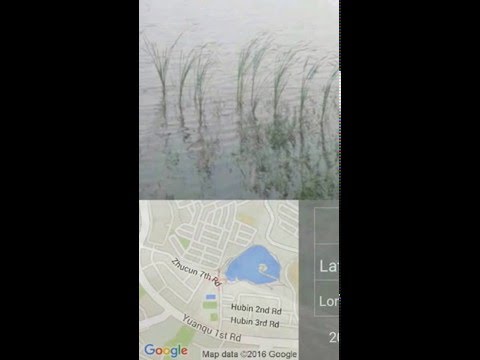
When you take a picture, this application will paste the map, address, weather and date to picture. (GPS latitude/longitude information also could be included)
This application is easy to get/set GPS location and GPS coordination for GPS Tag request.
[Quick GPS Map Camera Guideline]
When GPS Map Camera start, map/address/weather will be displayed on the camera preview. You can check the location/coordination before camera capture.
If you want to fine tune the location, manually setup the latitude and longitude also supported. (left-top button)
Support some drawing styles for map/address/weather/date. (left-top second button)
Support a variety of file-name formats to help you arrange your photos. (right-top second button)
You can change the picture save folder for help arrange photos. (right-top button)
In the camera setting page, the similar functions will be grouped with the same color.
- Camera Choice
- Flash
- Scene/Exposure/White Balance/ISO/Color Effect
- Focus Mode
- Anti-banding
- Picture Size/Picture Quality
- GPS Use/GPS picture save/Mp Type/Map Resolution/Map Zoom Scale/Map Size
- Photo Viewer
- Sound
- Prompt Dialog
The color of function string is white as default. If change to another function, the color will change to grouped color. It's better to recognize what you set.
[Others]
- Camera focus and zoom operation when preview:
Focus: use one finger to touch the screen.
Zoom: use two fingers to zoom in/out.
[Tips]
- Don't want to get MAP:
Settings -> GPS picture save -> one (original)
- Don't want to save GPS position:
Settings -> GPS Use -> disable GPS
- Don't want to popup prompt dialog:
Settings -> Prompt Dialog -> disable
【Final】
Thank you for use and watch! Hope this app is helpful for you.
When you take a picture, this application will paste the map, address, weather and date to picture. (GPS latitude/longitude information also could be included)
This application is easy to get/set GPS location and GPS coordination for GPS Tag request.
[Quick GPS Map Camera Guideline]
When GPS Map Camera start, map/address/weather will be displayed on the camera preview. You can check the location/coordination before camera capture.
If you want to fine tune the location, manually setup the latitude and longitude also supported. (left-top button)
Support some drawing styles for map/address/weather/date. (left-top second button)
Support a variety of file-name formats to help you arrange your photos. (right-top second button)
You can change the picture save folder for help arrange photos. (right-top button)
In the camera setting page, the similar functions will be grouped with the same color.
- Camera Choice
- Flash
- Scene/Exposure/White Balance/ISO/Color Effect
- Focus Mode
- Anti-banding
- Picture Size/Picture Quality
- GPS Use/GPS picture save/Mp Type/Map Resolution/Map Zoom Scale/Map Size
- Photo Viewer
- Sound
- Prompt Dialog
The color of function string is white as default. If change to another function, the color will change to grouped color. It's better to recognize what you set.
[Others]
- Camera focus and zoom operation when preview:
Focus: use one finger to touch the screen.
Zoom: use two fingers to zoom in/out.
[Tips]
- Don't want to get MAP:
Settings -> GPS picture save -> one (original)
- Don't want to save GPS position:
Settings -> GPS Use -> disable GPS
- Don't want to popup prompt dialog:
Settings -> Prompt Dialog -> disable
【Final】
Thank you for use and watch! Hope this app is helpful for you.
Add Map/Address/LatLng/Weather/Date to your photo when camera capture.
Aktualisiert am
Was die Sicherheit angeht, solltest du als Erstes verstehen, wie Entwickler deine Daten erheben und weitergeben. Die Datenschutz- und Sicherheitspraktiken können je nach deiner Verwendung, deiner Region und deinem Alter variieren. Diese Informationen wurden vom Entwickler zur Verfügung gestellt und können jederzeit von ihm geändert werden.


Bewertungen und Rezensionen
80.6 Tsg. Rezensionen
Neuerungen
V1.8.2:
1. Minor bugs fixed.
1. Minor bugs fixed.
App-Unterstützung
Informationen zum Entwickler
SHENG WEN LIAO
jacky.finalfantasy@gmail.com
光復路一段285巷6號
東區
新竹市, Taiwan 30074


