
Notion: Music Notation & Tab
In-app purchases

star
1.29K reviewsinfo

PEGI 3
info
100K+
Downloads


About this app
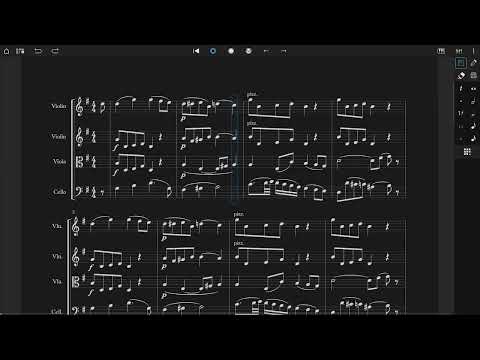
Notion is a free, award-winning music composition app for Android on phones, tablets, Chromebooks, and more! You’ll effortlessly compose dynamic sheet music in traditional musical notation or guitar tablature with its intuitive touch-based interface and incredibly broad editing capabilities.
With a user-friendly interface and simple interactive piano keyboard, fretboard, drum pad, and even optional Handwriting Recognition, Notion makes it easy to get started composing your music. You’ll hear your music performed with the most realistic playback possible, using real audio samples recorded by the London Symphony Orchestra at Abbey Road Studios.
Notion is a native cross-platform app, meaning you can write anywhere on any device without requiring a constant Internet connection. And when you’re back online, you’ll be able to sync your work across multiple devices through your preferred cloud provider. Start your work on one device and finish it on another. Once you are happy with your creation you can share the Notion file, or export as MIDI, MusicXML, PDF or as an audio file. You can even optionally transmit scores across a network with other instances of Notion, or between Notion and the Fender Studio Pro DAW.
Compose, edit, and play back your sheet music performed with real piano and orchestral samples recorded by the London Symphony Orchestra at Abbey Road Studios — along with outstanding sampled guitar, bass, drums and other popular instruments. And when you’re ready for more sounds, you’ll find the extensive library of Notion Add-on Soundsets as part of the Feature Bundle. To save space, the initial app download contains just piano — you can then manage which of the bundled Soundsets to have on your device or keep in the cloud, just tap on Sound Installation.
Notion has been featured in various worldwide campaigns and has won several awards, including a prestigious music industry NAMM TEC Award for Best Smartphone/Tablet App.
What you get:
Notion includes unlimited staves, comprehensive editing features and core orchestral and rhythm section Soundsets — all for free. Register to get an additional free Welcome Pack which unlocks an additional Soundset (containing Solo Strings, Classical Saxophones, and Glockenspiel), and the multivoice function that allows writing in up to four voices per staff. Then for the full experience, either sign in with your Fender Studio Pro+ membership or purchase the Notion Feature Bundle. This unlocks Handwriting Recognition, all the Expansion Soundsets (including many auxiliary instruments and additional articulations and effects), additional audio export formats (m4a, OPUS, FLAC) and direct score transfer with Notion and Fender Studio Pro running on the same network.
Free:
Unlimited staves
All editing features
Core Soundsets
Export as MIDI, PDF, wav, mp3
Register for free:
Reward Soundset including Solo Strings, Glockenspiel, Classical Saxophones
Additionally write for voices 3 and 4 in a single staff
Export as MusicXML, Compressed MusicXML
Feature Bundle:
Handwriting Recognition, powered by MyScript
Automatic pen vs. finger recognition to switch between handwriting and edit mode with supported styluses
Adjustable timer for Handwriting Recognition
Layout Control
All Expansion Soundsets
Additional audio export formats (m4a, OPUS, FLAC)
Transmit scores across a network with other instances of Notion, or between Notion and Fender Studio Pro
With a user-friendly interface and simple interactive piano keyboard, fretboard, drum pad, and even optional Handwriting Recognition, Notion makes it easy to get started composing your music. You’ll hear your music performed with the most realistic playback possible, using real audio samples recorded by the London Symphony Orchestra at Abbey Road Studios.
Notion is a native cross-platform app, meaning you can write anywhere on any device without requiring a constant Internet connection. And when you’re back online, you’ll be able to sync your work across multiple devices through your preferred cloud provider. Start your work on one device and finish it on another. Once you are happy with your creation you can share the Notion file, or export as MIDI, MusicXML, PDF or as an audio file. You can even optionally transmit scores across a network with other instances of Notion, or between Notion and the Fender Studio Pro DAW.
Compose, edit, and play back your sheet music performed with real piano and orchestral samples recorded by the London Symphony Orchestra at Abbey Road Studios — along with outstanding sampled guitar, bass, drums and other popular instruments. And when you’re ready for more sounds, you’ll find the extensive library of Notion Add-on Soundsets as part of the Feature Bundle. To save space, the initial app download contains just piano — you can then manage which of the bundled Soundsets to have on your device or keep in the cloud, just tap on Sound Installation.
Notion has been featured in various worldwide campaigns and has won several awards, including a prestigious music industry NAMM TEC Award for Best Smartphone/Tablet App.
What you get:
Notion includes unlimited staves, comprehensive editing features and core orchestral and rhythm section Soundsets — all for free. Register to get an additional free Welcome Pack which unlocks an additional Soundset (containing Solo Strings, Classical Saxophones, and Glockenspiel), and the multivoice function that allows writing in up to four voices per staff. Then for the full experience, either sign in with your Fender Studio Pro+ membership or purchase the Notion Feature Bundle. This unlocks Handwriting Recognition, all the Expansion Soundsets (including many auxiliary instruments and additional articulations and effects), additional audio export formats (m4a, OPUS, FLAC) and direct score transfer with Notion and Fender Studio Pro running on the same network.
Free:
Unlimited staves
All editing features
Core Soundsets
Export as MIDI, PDF, wav, mp3
Register for free:
Reward Soundset including Solo Strings, Glockenspiel, Classical Saxophones
Additionally write for voices 3 and 4 in a single staff
Export as MusicXML, Compressed MusicXML
Feature Bundle:
Handwriting Recognition, powered by MyScript
Automatic pen vs. finger recognition to switch between handwriting and edit mode with supported styluses
Adjustable timer for Handwriting Recognition
Layout Control
All Expansion Soundsets
Additional audio export formats (m4a, OPUS, FLAC)
Transmit scores across a network with other instances of Notion, or between Notion and Fender Studio Pro
Compose anywhere
Updated on
Safety starts with understanding how developers collect and share your data. Data privacy and security practices may vary based on your use, region, and age. The developer provided this information and may update it over time.
- No data shared with third partiesLearn more about how developers declare sharing
- This app may collect these data typesPersonal info and Device or other IDs
- Data is encrypted in transit
- You can request that data be deleted
- Committed to follow the Play Families Policy


Ratings and reviews
976 reviews

Phillip Toutant
- Flag inappropriate
August 19, 2026
I've been using notion for close to decade or more for all my charting and gigs and since the purchase the software is so incredibly buggy on Ipad when tablet use was the whole point. Simple copy and paste features only work sometimes, and some of those times they paste correct rhythms with wrong voices. Several features that were once accessable on tablet now need extra accessories or only work on pc. today I restarted the program as it wouldn't copy and it didn't auto save my chart.Work gone
1 person found this review helpful

Zandisa Kahla
- Flag inappropriate
June 27, 2026
Best composing app for android but the reason i gave it a four is because of the instruments sounds(why do we have to download the correct sound of the instrument like why)and the vocals( they need to sing the lyrics that have been put there pls because we composers need the vocals to sing the lyrics in order for us to enjoy the the way we write so yeah those are the only things i wanted to address so with all due respect to the company i am pleading to make a update of the app thank you
1 person found this review helpful

Yax Verdura
- Flag inappropriate
May 16, 2026
For the price it is amazing. At first it was hard to get to know it and find different tools, but once you explore enough it is really great. I would just like the response time when you write with a pencil to be shorter.
2 people found this review helpful
What’s new
Welcome to Notion 3.7.1 Maintenance Release
For the full guide, check: https://shorturl.at/sAETQ
For the full guide, check: https://shorturl.at/sAETQ
App support
About the developer
Fender Musical Instruments Corporation
support@fender.com
17600 N Perimeter Dr Ste 100
Scottsdale, AZ 85255
United States
+1 323-210-1800


