
Diamond Hearts Watch Face

star
26 reviewsinfo

PEGI 3
info
500+
Downloads

PEGI 3
Learn more


About this app
Update:
NEW! Available Live Preview on the talexwatch.com!
You can check the watch face cusromizations and beautiful twinkling effect directly on the site.
Look at third screenshot for preview screen.
🎨 Live Preview Link: https://talexwatch.com/preview/diamond_hearts
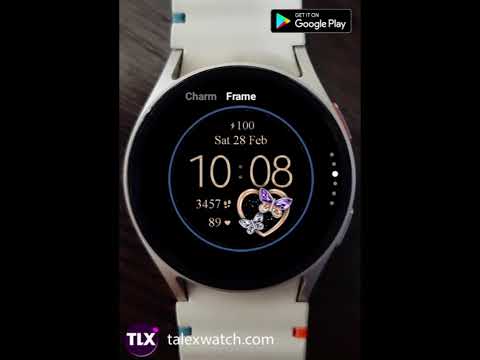
Diamond Hearts - something special for your Wear OS smart watch. Elegant twinkle effect is battery friendly.
6 Heart Charms + 6 Frame styles = 36 combinations - make your own!
Active mode Features:
- 12/24h Digital time HH:MM (AUTOsync to your phone time)
- Beautiful live twinkle effect - battery friendly
- 6 Charms + 6 Frame styles = 36 style Combinations
- Step counter + Shortcut (tap to open)
- Month/Date/Day of Week
- Shortcut to Calendar (tap Date to open)
- Heart rate + Measuring HR shortcut (tap to start)
- Multilanguage
- Battery level (%)
Stay Connected:
FACEBOOK:
https://www.facebook.com/stylishwatchfaces
INSTAGRAM:
https://www.instagram.com/smart_watch_faces
WEB:
https://www.talexwatch.com
Thank you for supporting TALEX Watch Faces!
Feel fee to contact us if you have any questions or suggestions!
NEW! Available Live Preview on the talexwatch.com!
You can check the watch face cusromizations and beautiful twinkling effect directly on the site.
Look at third screenshot for preview screen.
🎨 Live Preview Link: https://talexwatch.com/preview/diamond_hearts
Diamond Hearts - something special for your Wear OS smart watch. Elegant twinkle effect is battery friendly.
6 Heart Charms + 6 Frame styles = 36 combinations - make your own!
Active mode Features:
- 12/24h Digital time HH:MM (AUTOsync to your phone time)
- Beautiful live twinkle effect - battery friendly
- 6 Charms + 6 Frame styles = 36 style Combinations
- Step counter + Shortcut (tap to open)
- Month/Date/Day of Week
- Shortcut to Calendar (tap Date to open)
- Heart rate + Measuring HR shortcut (tap to start)
- Multilanguage
- Battery level (%)
Stay Connected:
FACEBOOK:
https://www.facebook.com/stylishwatchfaces
INSTAGRAM:
https://www.instagram.com/smart_watch_faces
WEB:
https://www.talexwatch.com
Thank you for supporting TALEX Watch Faces!
Feel fee to contact us if you have any questions or suggestions!
Beautiful twinkling watch face. 6 Heart Charms. Battery friendly
Updated on
Safety starts with understanding how developers collect and share your data. Data privacy and security practices may vary based on your use, region, and age. The developer provided this information and may update it over time.
- No data shared with third partiesLearn more about how developers declare sharing
- No data collectedLearn more about how developers declare collection


Ratings and reviews
9 reviews

Donna Barton
- Flag inappropriate
July 4, 2023
I like the app but it won't recond your steps and yes all my permissions are on even on my watch
Talex Watch Faces
July 4, 2023
Thanks for your feedback. Sorry just for case) pls Restart your Watch. Then check if permissions for this wf on your watch are on. Swipe down>Settings>Apps>Permissions>Diamond Hearts>Sensors>allow.

Denise Rogers
- Flag inappropriate
May 6, 2025
beautiful. love it
Talex Watch Faces
May 7, 2025
Thank you!
What’s new
Updated to new SDK version
PEGI 3
Learn moreApp support
About the developer
Galkina Tatiana
talexwatch@gmail.com
M. Mametova str. 50/1, 19
Zapadno-Kazakhstanskaya region
090002 Uralsk
Kazakhstan


